Essential Avaya Phone System Spare Parts Every Business Should Keep | Morgan Birgé
Essential Avaya Phone Parts Every Business Should Have on Hand
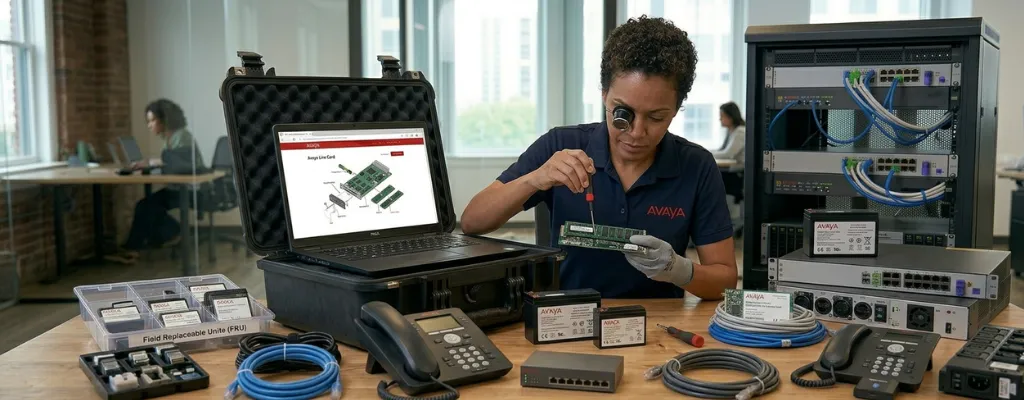
Why a Spare Parts Strategy Matters
When an Avaya phone system component fails, the clock starts immediately. Every hour without working phones means missed calls, frustrated customers, and lost productivity. A midsize business typically loses around $110,000 for every hour of phone system downtime, and most of that loss is preventable with the right parts already on the shelf.
Having key spare parts on hand doesn't require a large investment. It requires knowing which components fail most often and making sure a replacement is available before the failure happens.
The SD Card
The SD card is the single most important spare part for any Avaya IP500 V2 deployment. It holds the system configuration, firmware files, and voice prompts. Without it, the system cannot boot.
The IP500 V2 requires a system SD card to operate. It supports both a primary system SD card slot and an optional second slot, making it the most critical single component in the entire control unit. SD cards degrade over time, and a failing card doesn't always produce obvious errors before it causes a full system outage.
Keep one pre-loaded spare on hand. Store a current configuration backup on it so that a swap means minutes of downtime, not hours of rebuilding from scratch.
The Control Unit Power Supply
The internal power supply unit inside the IP500 V2 control unit is a high-wear component that fails with age. When it goes, the entire system goes down with it: no phones, no calls, no voicemail.
The Avaya IP500 V1/V2 replacement internal power supply runs on 100–240V input with a 130W max output and can be installed in under 20 minutes. Refurbished units are widely available and significantly cheaper than new. This is the one part that, if it fails without a spare, sends your whole office home.
Expansion Module Power Supplies
Expansion modules use their own external power supply units, separate from the control unit. Each external expansion module is supplied with its own external PSU, which includes an integral cable for connection to the module. These PSUs are separate failure points, and when one fails, every phone on that module goes offline instantly.
Keeping one spare PSU per expansion module type in your environment is low-cost insurance. The 60W external PSU (part 700357387) is the standard spare for IP400 and IP500 expansion modules and is available from multiple third-party suppliers as a compatible replacement.
Expansion Interconnect Cables
The blue interconnect cable connects each expansion module to the IP500 V2 control unit. It's a short, purpose-built cable, and it's not something you can substitute with a standard patch cable in a pinch.
Each expansion module is supplied with a blue 1-meter interconnect cable that must be used when connecting to expansion ports on the rear of the control unit. A yellow 2-meter cable is used only when connecting to an IP500 4-Port Expansion card; the two cable types are not interchangeable.
Keep one spare blue cable for each expansion module you have. They're inexpensive and easy to store. A damaged cable produces intermittent module failures that are surprisingly difficult to diagnose without a spare to swap in and test.
A Spare Desk Phone
When a desk phone fails, the most disruptive scenario is that it belongs to a receptionist, manager, or sales rep whose phone can't wait two business days for shipping. Having one or two spare phones on hand, matching the model most commonly deployed in your office, means that a failed handset is a 5-minute fix, not a business disruption.
For most businesses running J-series phones, keeping a spare J169 or J179 covers the majority of scenarios. Both are mid-range models that can be quickly programmed to replace any failed handset in the same series.
Headset Adapters and Cables
Headsets fail more often than any other peripheral on an Avaya system, and the most common reason a replacement headset "doesn't work" is that the right adapter cable wasn't ordered alongside it.
Keep these on hand, depending on your phone models:
HIS adapter cable - required for most corded headsets on J100, 9600, and 1600 series phones
APV-63 EHS cable - required for Plantronics/Poly wireless headsets on J100 series phones
Jabra Link 35 - required for Jabra wireless headsets on J100 series phones
Ordering a headset without the correct adapter means it sits in the box until the part arrives. Keeping one spare of each adapter in your environment eliminates that delay entirely.
AAA Batteries for Partner ACS Systems
For businesses still running an Avaya Partner ACS system, two AAA alkaline batteries are the smallest and most overlooked spare part, and the most consequential when they run out.
When the batteries die and the power goes out, the system loses all of its programming and boots with factory defaults. Keeping a spare set of name-brand AAA batteries near the phone system cabinet takes 30 seconds of preparation and eliminates that risk entirely. Replace them every one to two years as part of routine Avaya maintenance.
A Current Configuration Backup
This isn't a physical part, but it belongs on this list. A configuration backup stored off-system is the single most valuable thing you can have when any hardware component fails. Without it, replacing a failed control unit or SD card means rebuilding every extension, hunt group, and call route from scratch.
Export a fresh configuration backup from IP Office Manager:
After any system change
Before any firmware upgrade
At a minimum, once per month as a scheduled task
Store it somewhere accessible: a shared drive, a secure cloud folder, or with your Avaya support provider, so that it's reachable at 2 AM when something goes wrong.
Where to Source Spare Parts
New Avaya hardware is increasingly difficult to source as the IP500 platform matures. Refurbished parts from reputable third-party suppliers are a practical and cost-effective alternative for most components.
When buying refurbished:
Confirm the part number matches your exact model
Buy from suppliers that test and warrant their inventory
Verify compatibility with your current firmware version before purchasing expansion modules
Advance parts replacement agreements through an Avaya support partner can also provide next-business-day or even 4-hour delivery of replacement components, which removes the need to stock certain parts locally for businesses that have active maintenance coverage.
The Cost of Not Having Spares
Sourcing a part after a failure costs more in every dimension: more money, more downtime, and more stress. Most of the components on this list cost less than an hour of downtime to stock. The businesses that weather hardware failures quickly aren't lucky; they're prepared.
Need Help With Parts or Maintenance?
If you're not sure which spare parts apply to your specific Avaya configuration, or you want to make sure your system is covered before something fails, a qualified business communication solutions partner that offers Avaya support can audit your setup and recommend exactly what to keep on hand.